App screens
Auth, app shells, dashboards, data tables, workflows, settings and AI chat screens for product and admin interfaces.
78 blocks in 8 groups, each in 8 styles, light and dark, LTR and RTL.
78 blocks
Auth · 14
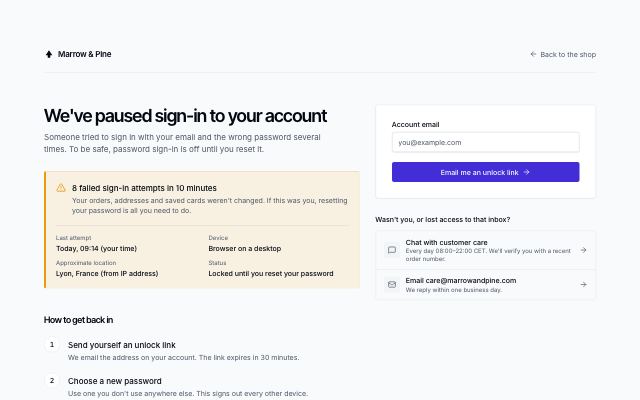
Locked account recovery
productLocked or suspicious sign-in notice with what happened (time, device, approximate location), numbered steps to get back in, an unlock-link form with a resend countdown and ways to contact support.
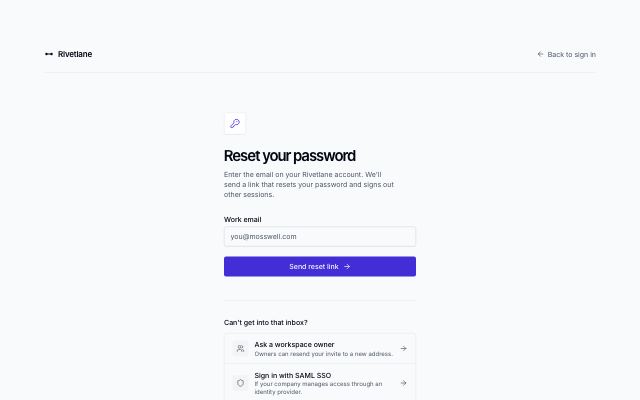
Forgot password request
productNarrow reset form under a brand bar with a back link; submitting swaps in a check-your-inbox state with tips, and recovery options sit below.
In Rivetlane app
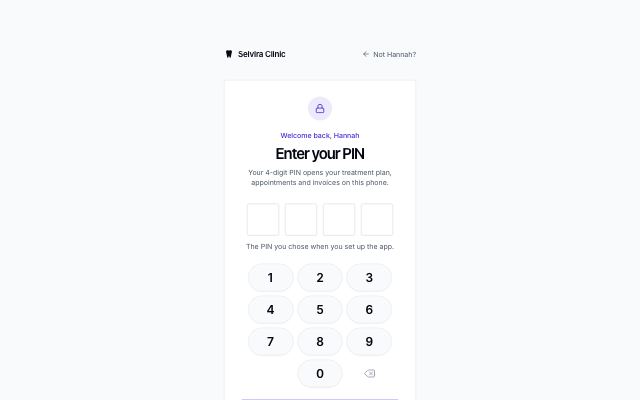
Four-digit PIN
productNarrow card with four large masked PIN cells, an on-screen number pad for touch and a wrong-PIN state that shakes (unless motion is reduced), with reset options below.
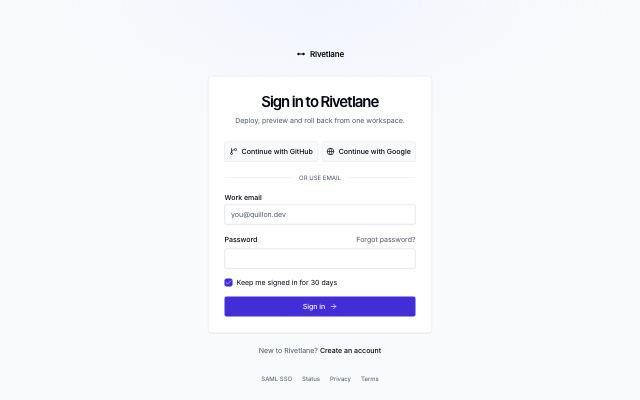
Sign-in card
productCentered card with SSO provider buttons, email and password, a remember-me checkbox, a forgot-password link and a sign-up line.
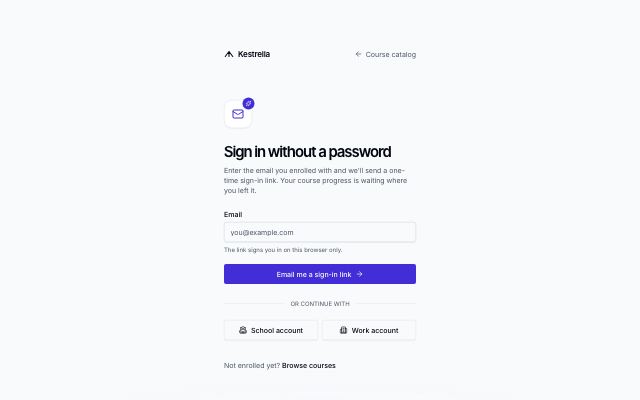
Magic-link sign-in
productEmail-only sign-in that sends a one-time link; submitting swaps in a check-your-email state with an open-mail-app button, a resend countdown and a change-address link, with optional SSO below.
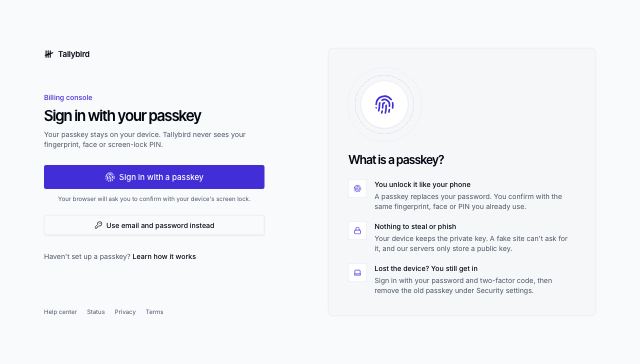
Passkey sign-in
productPasskey button as the main way in, with a waiting-for-your-device state and a password fallback; a panel beside it explains what a passkey is.
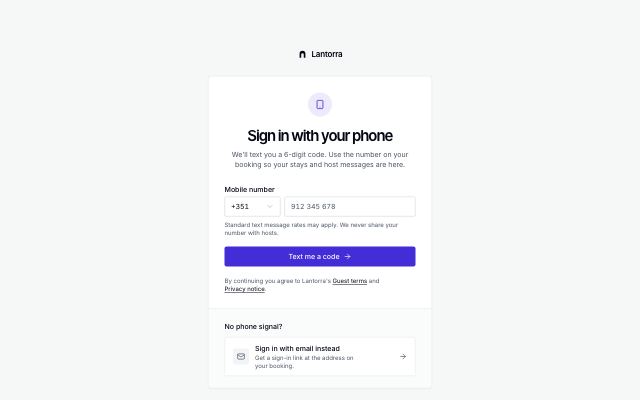
Phone sign-in with code
productCard with a country-code picker and phone number that moves, in place, to a 6-digit code step with a resend countdown and a change-number link; email fallback in a tray below.
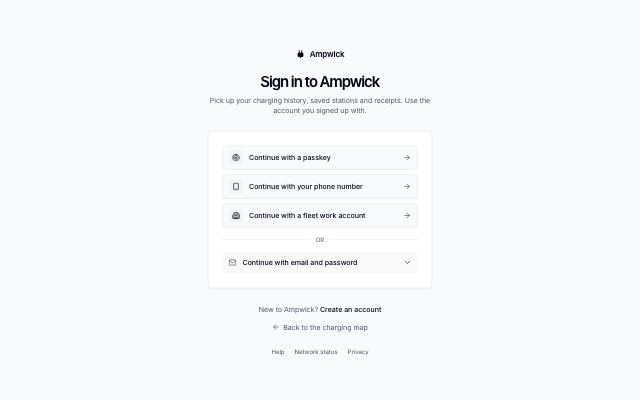
Provider-first sign-in
productCard that leads with large sign-in method rows (passkey, phone, work account) and keeps email and password behind a disclosure underneath.
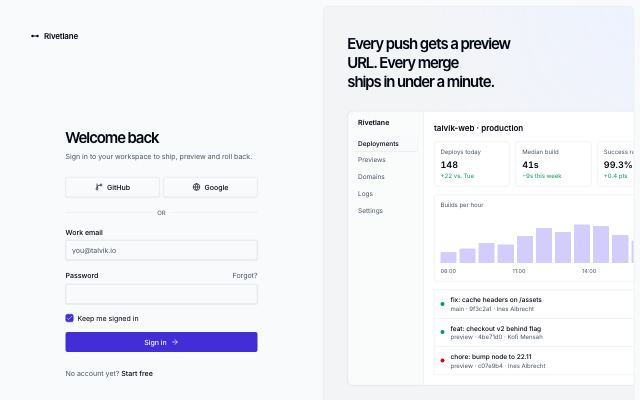
Split sign-in with brand panel
productSign-in form on the left; on the right a tinted brand panel with a headline, a live product screen and a customer quote.
In Rivetlane app, Threadmere
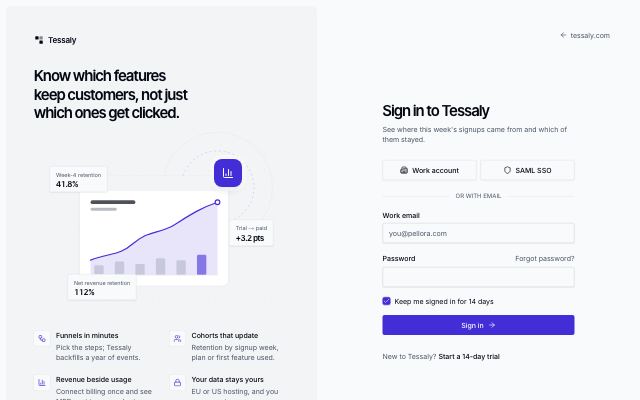
Split sign-in with illustration
productTinted panel with a headline, a drawn product scene and value points beside a sign-in form with SSO, email and password.
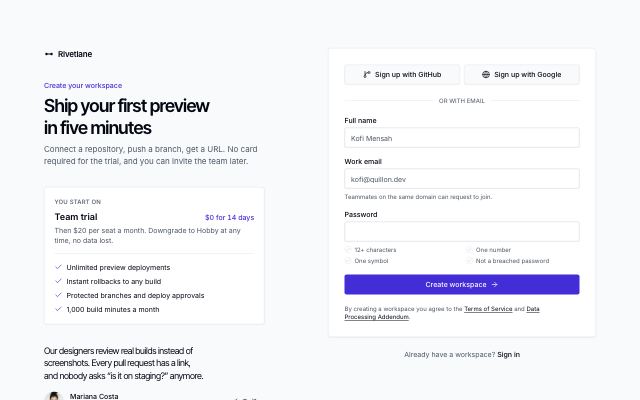
Sign-up form with plan hint
productHeadline and the plan a new account starts on beside a sign-up card with SSO, name, email and a password with requirement hints, plus a terms line.
In Rivetlane app
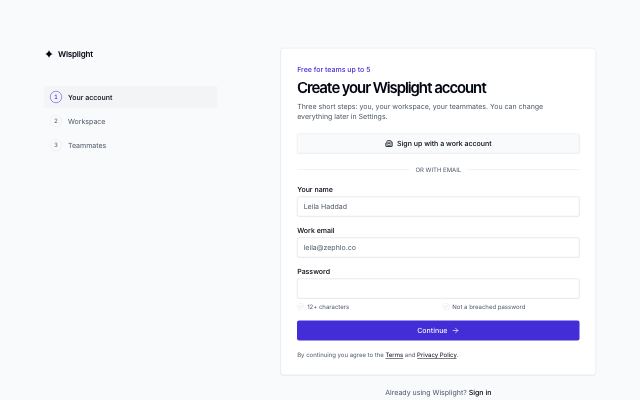
Multi-step sign-up
productSign-up in three steps (account, workspace, invite teammates) with a step list on wide screens, a progress bar on small ones, back and skip, and a ready state.
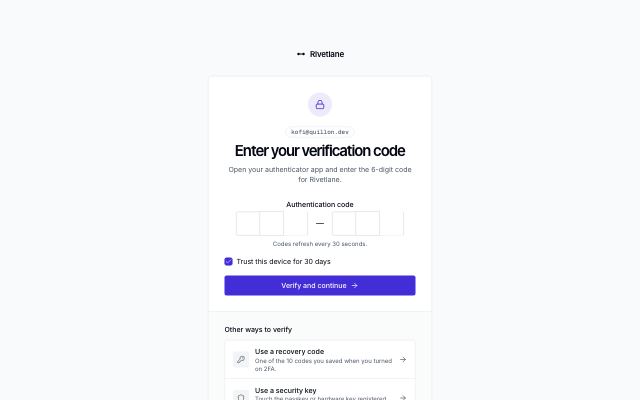
Two-factor code
productCard with the signed-in account, a 6-digit one-time code input and a trust-this-device option, over a tray of recovery options.
In Rivetlane app
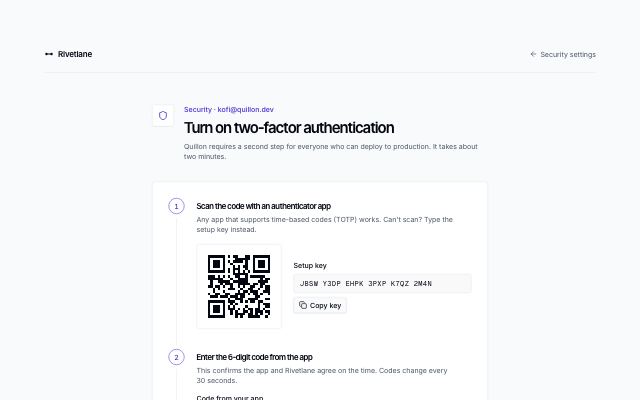
Authenticator app setup
productThree numbered steps in one card: scan a QR-style code or copy the setup key, confirm a 6-digit code, then download or copy one-time recovery codes.
Shell & navigation · 9
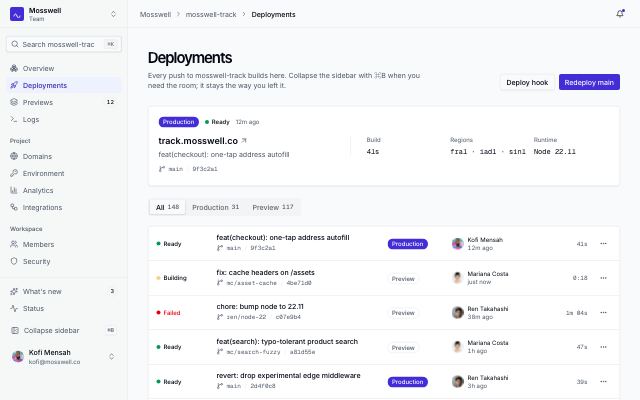
App shell with collapsible icon rail
productA sidebar that folds to an icon rail with tooltips; the choice is remembered per workspace and ⌘B toggles it. Breadcrumb top bar, mobile drawer that closes on navigation.
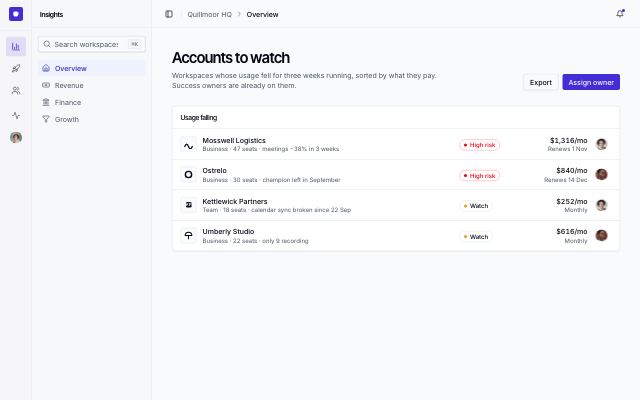
App shell with icon rail and panel
productTwo-level navigation: an icon rail of sections (a vertical tab list with tooltips and arrow keys) beside a panel of the chosen section's pages, which folds away to leave the rail.
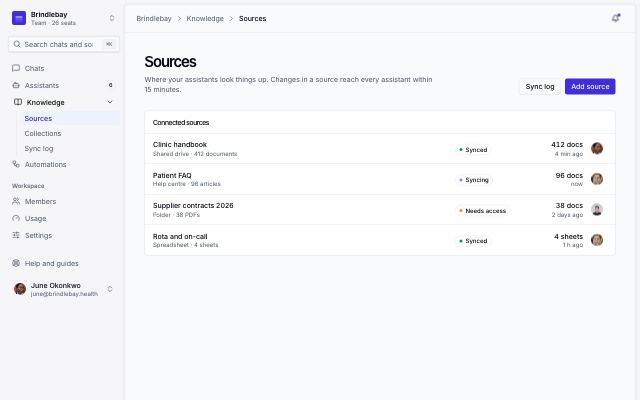
Inset app shell
productThe inset layout: a borderless sidebar on a tinted canvas and the page floating beside it as a rounded, raised panel; a drawer takes the nav on phones.
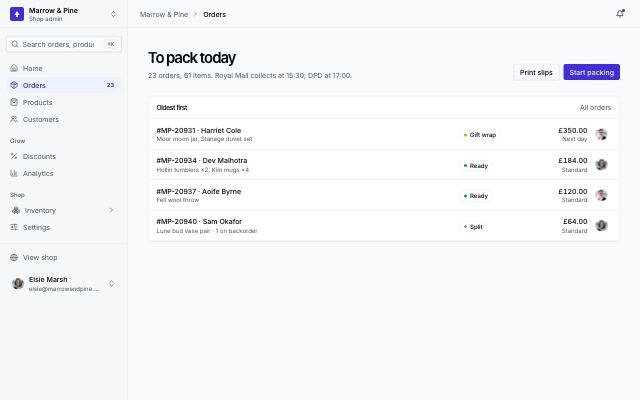
Mobile app shell with tab bar and drawer
productPhone-first frame: a bottom tab bar for the four main pages and a More tab that opens the full menu in a drawer which closes as soon as a page is picked; a sidebar from large screens.
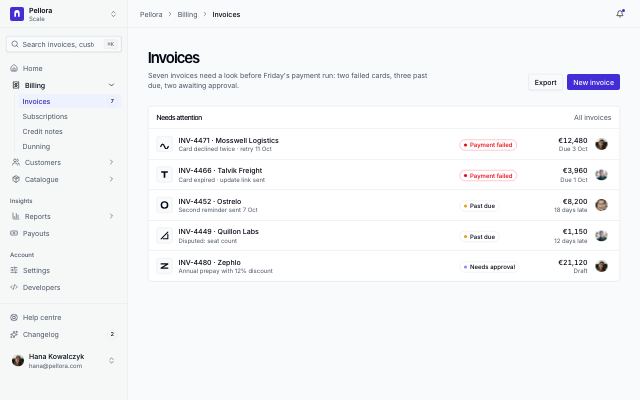
App shell with nested submenus
productA sidebar whose items open submenus of sub-pages on an indented guide line, the current branch open; search, lower links and account at the foot, and the same tree in a mobile drawer.
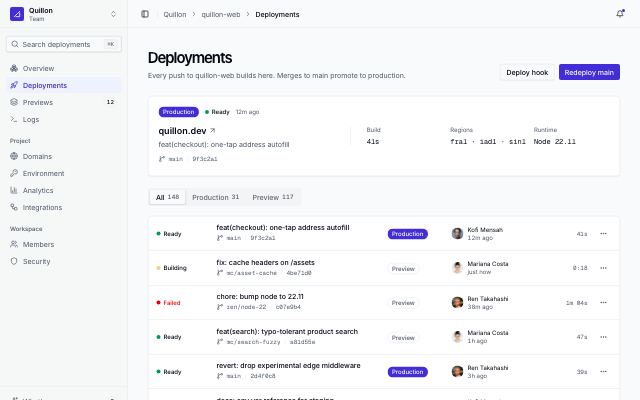
App shell with collapsible sidebar
productCollapsible sidebar with workspace switcher, search, sectioned nav and user menu; a top bar with breadcrumbs; and a page header over a deployments view.
In Rivetlane app
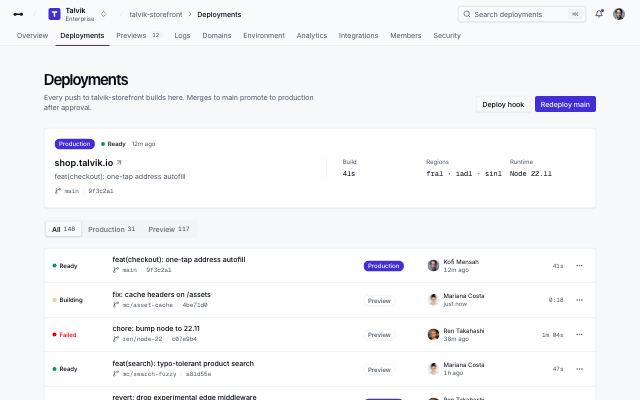
App shell with top navigation
productTop bar with logo, workspace switcher, breadcrumbs, search and user menu over a row of nav tabs; the page header and a deployments view sit below.
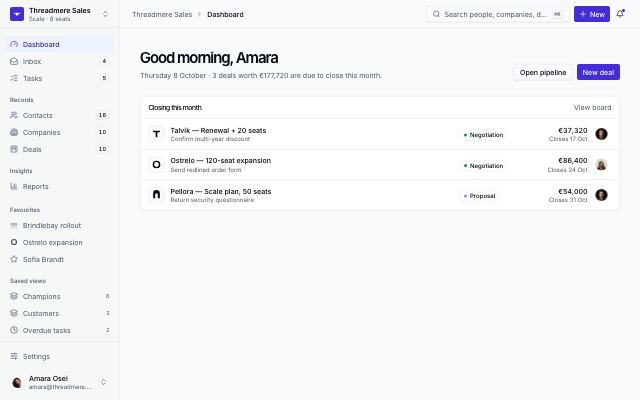
App shell with favourites and ⌘K
productA record-heavy app's frame: workspace switcher, nav with counts, pinned records and saved views in the sidebar; a top bar with a ⌘K palette, a New menu for any record and the account menu.
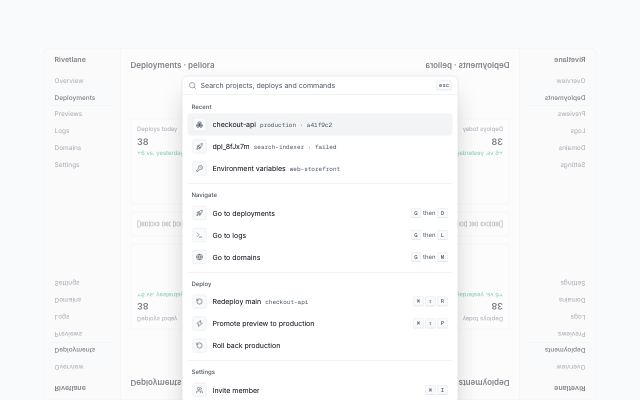
Command palette over the app
productA working command palette shown open in-flow over a dimmed app screen: search input, recent items, Navigate / Deploy / Settings groups with keyboard shortcuts, and a key-hint footer.
In Rivetlane app
Dashboards · 14
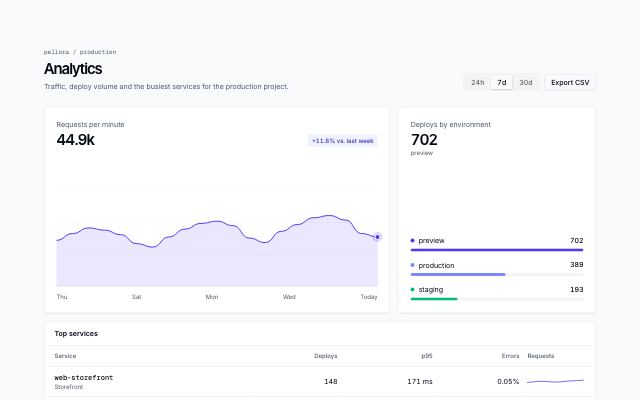
Analytics with period switcher
productAn analytics view: a period switcher in the page header drives a main area chart, a breakdown of bars and a top-services table with inline trends.
In Rivetlane app
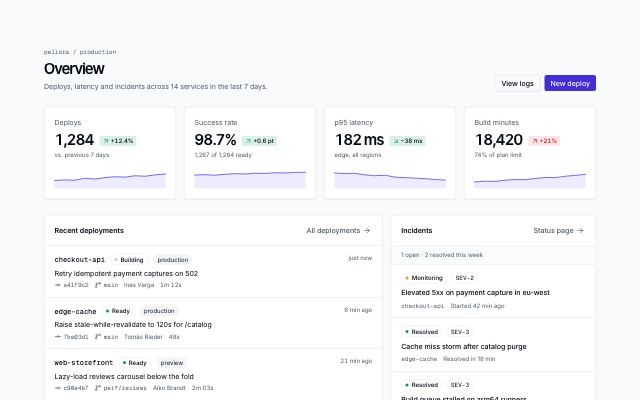
Overview with KPIs and activity
productA dashboard home: page header with actions, KPI cards with deltas and sparklines, a recent-deployments feed and an incidents panel.
In Rivetlane app
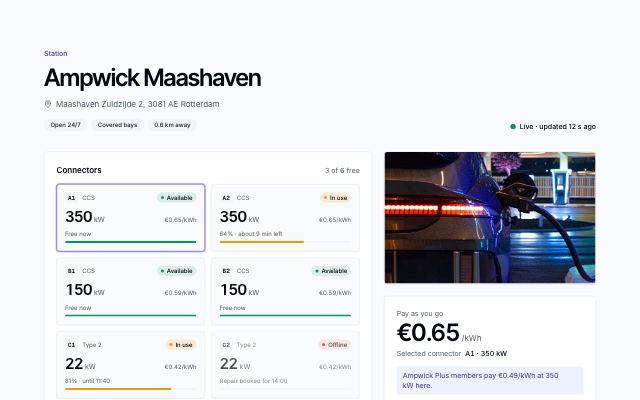
Charging station with live connectors
productOne station: every connector with live status, power and charge level, a price panel that follows the selected connector and starts the session, a photo and what's nearby while you wait.
In Ampwick
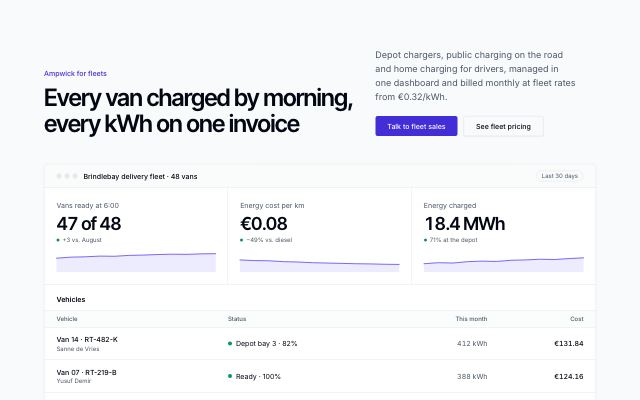
Fleet offer with a dashboard preview
productA fleet pitch proven by the manager's dashboard: three KPIs with trends that count up, a live vehicle list with charge status, four benefits and the fleets already on board.
In Ampwick
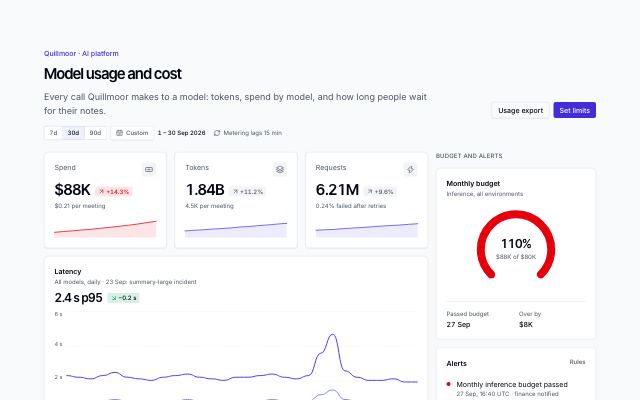
AI usage and cost dashboard
productWhat an AI feature costs to run: spend, tokens and requests, p50/p95 latency, tokens and spend by model, a model table with cost and errors, and a side column with the monthly budget gauge, alerts and the heaviest workspaces.
In Quillmoor admin
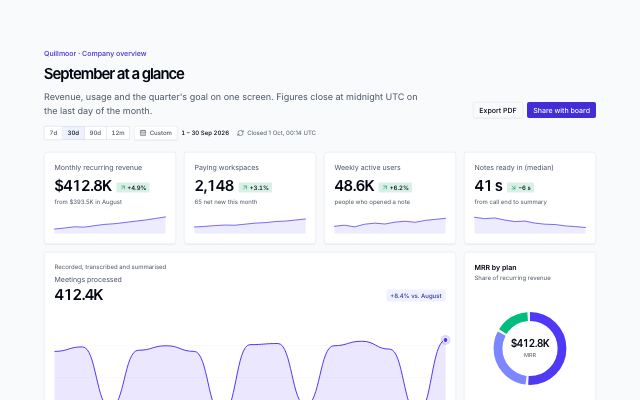
Dashboard chart cards
productA set of dashboard cards on one grid: KPIs with deltas and sparklines, an area chart with range tabs, stacked columns, a donut with legend, a radial goal and a short list.
In Quillmoor admin
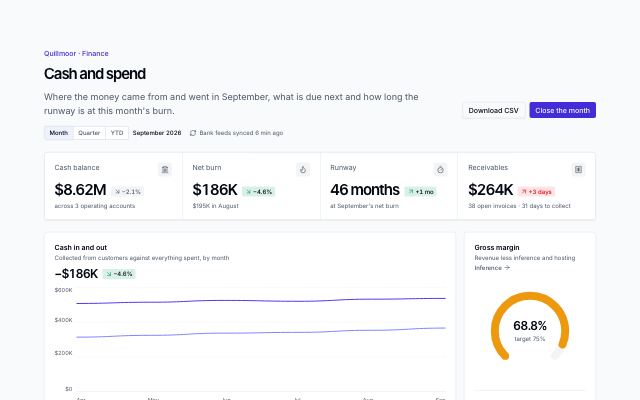
Finance dashboard
productA finance home: cash, burn, runway and receivables in one KPI band, cash in against out, gross margin against target, spend by category, budget against actual, upcoming payments and overdue invoices.
In Quillmoor admin
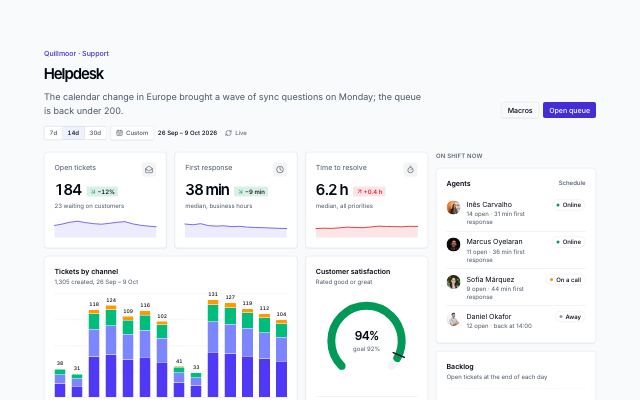
Support helpdesk dashboard
productA support team's live view: open tickets, first response and time to resolve, tickets by channel per day, CSAT against goal, tickets about to breach with assignees, top topics, response targets by priority, and agents on shift beside the grid.
In Quillmoor admin
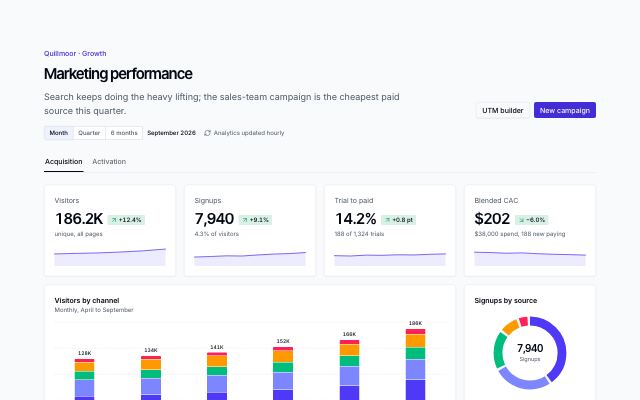
Marketing analytics dashboard
productGrowth in two views: visitors, signups, trial-to-paid and CAC, visitors by channel, signups by source, campaigns with cost per signup and trend, top landing pages — then activation with a signup-to-paid funnel and weekly retention cohorts.
In Quillmoor admin
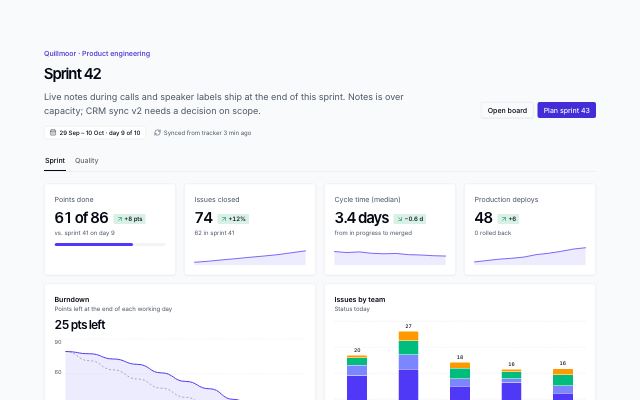
Project and issue dashboard
productAn engineering team's sprint in view tabs: points, issues, cycle time and deploys, a burndown against the ideal line, issues by team and status, epics with owners and progress, team load — and a quality view with bugs by severity and area.
In Quillmoor admin
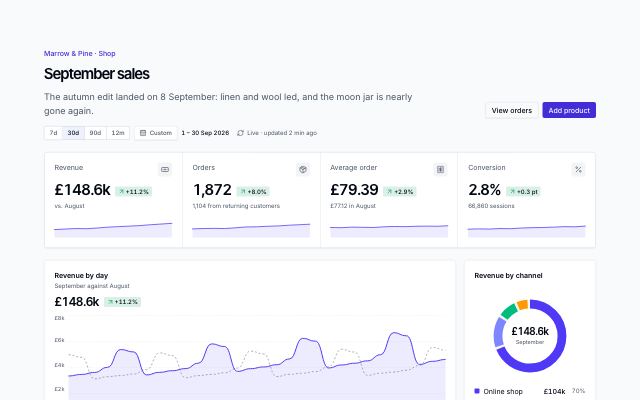
Store dashboard
productAn online shop's month: revenue, orders, average order and conversion in a KPI band, revenue by day against last month, channel mix, orders by category, the visit-to-order funnel, best sellers with stock and what is running low.
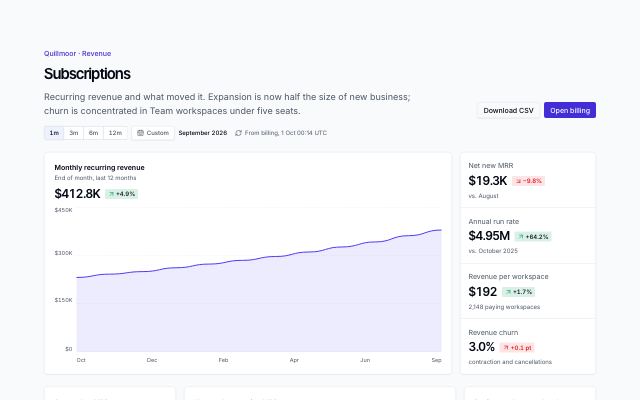
Subscription revenue dashboard
productSaaS revenue: twelve months of MRR as a lead chart with net new, run rate, revenue per workspace and churn stacked beside it, then September's MRR movement, new against expansion, plan mix, retention cohorts and recent plan changes.
In Quillmoor admin
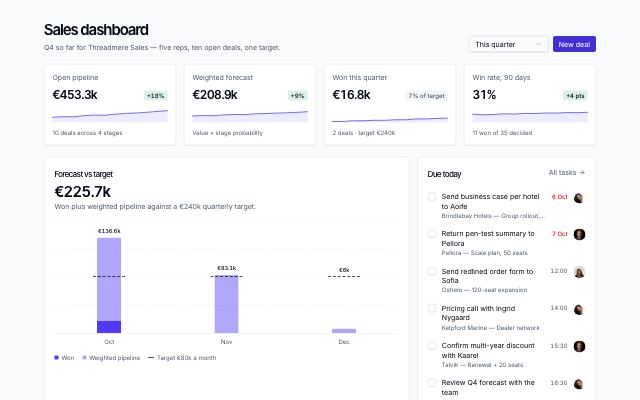
Sales dashboard with forecast and pipeline
productA sales team's home screen: KPI tiles with trends, forecast against target, tasks due today, pipeline value by stage, top open deals and a recent-activity feed.
In Threadmere
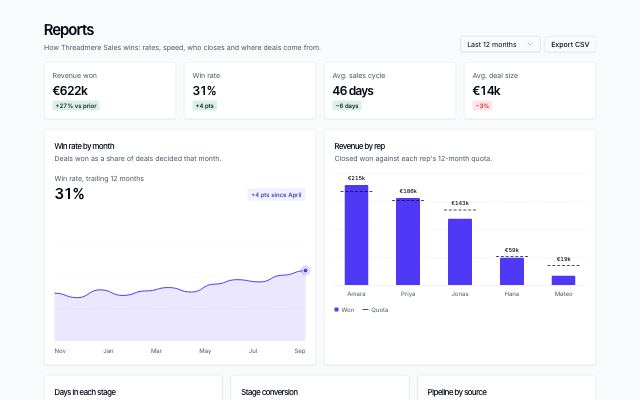
Sales reports with chart panels
productA sales team's reports page: KPI tiles, win rate over time, revenue by rep against quota, days in each stage, stage conversion, pipeline by source and a rep leaderboard with quota bars.
In Threadmere
Data · 8
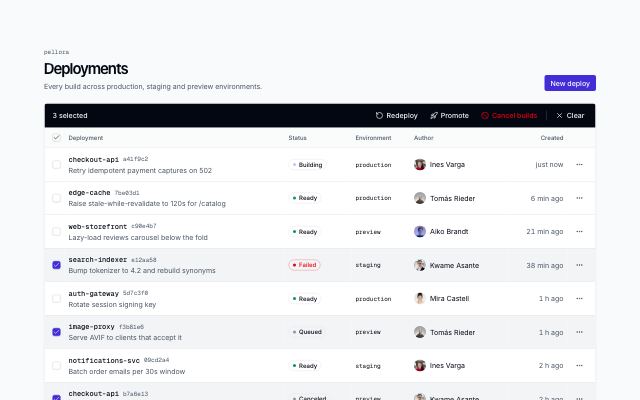
Data table with bulk actions
productA records page with row selection: per-row and select-page checkboxes, a bulk action bar that replaces the toolbar while rows are selected, row menus and pagination.
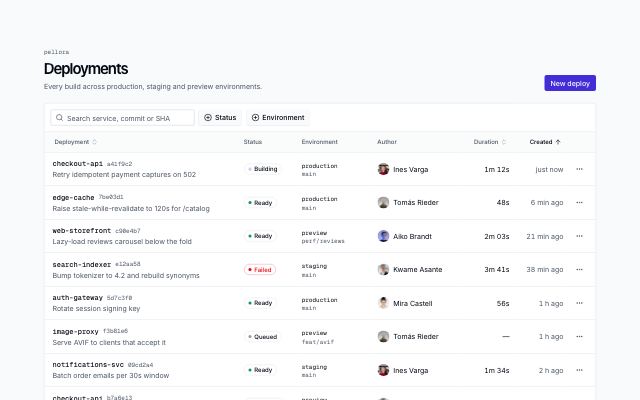
Filterable data table
productA records page: search, faceted multi-select filters with counts, sortable headers, status badges, row action menus and pagination. Scrolls sideways inside its card on small screens.
In Rivetlane app
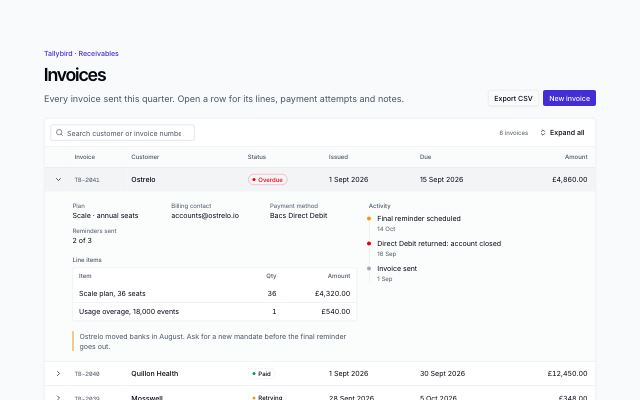
Table with expandable rows
productA records table whose rows open in place: key fields, a line-item table, an activity timeline and a note under each row, with search, expand all and a totals footer.
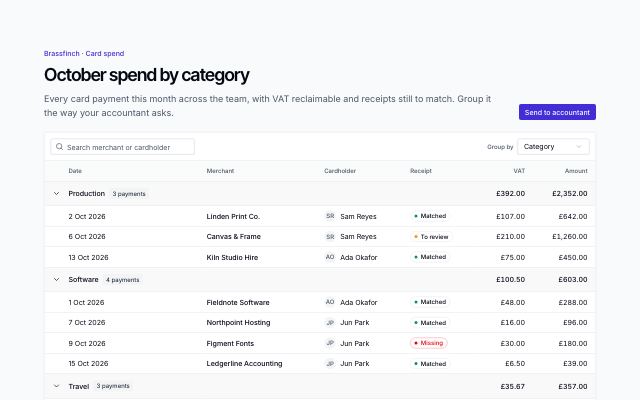
Grouped table with group totals
productA records table grouped by a column the reader picks: collapsible group headings with counts and subtotals in every amount column, search, and a grand total footer.
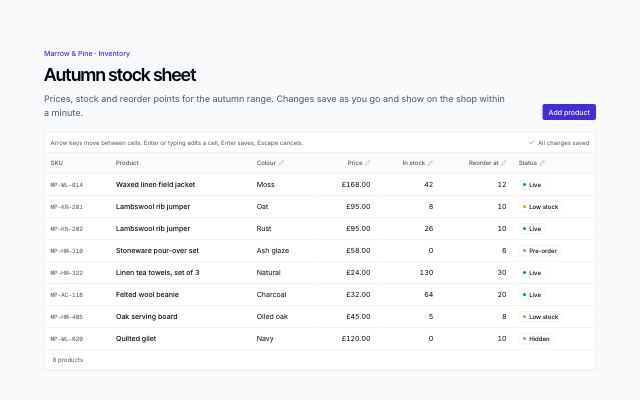
Inline-edit table
productA spreadsheet-like grid: arrow-key navigation, Enter or typing to edit a cell, number bounds with inline errors, status pickers, optimistic saves with a saving/saved indicator and undo.
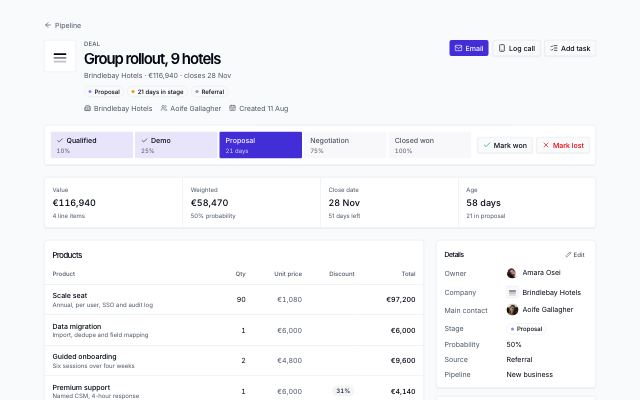
Deal page with stage path and line items
productA deal record: header with a stage path and won/lost actions, highlight figures, products with discounts and totals, the activity timeline, and an aside with details, stakeholders, pinned notes and next steps.
In Threadmere
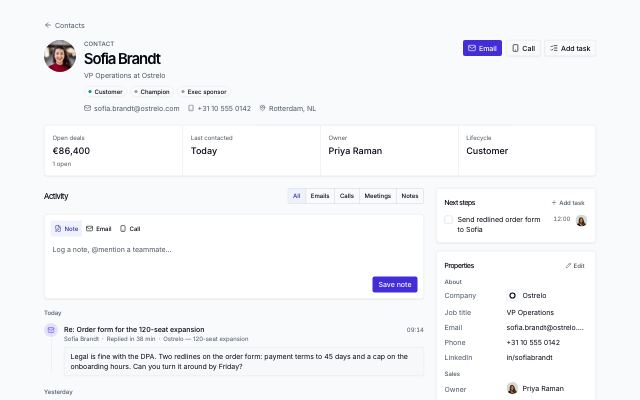
Record page with activity timeline
productA contact or company record: identity header with actions, highlight figures, an activity timeline with a note composer and kind filters, and an aside with next steps, properties and related records.
In Threadmere
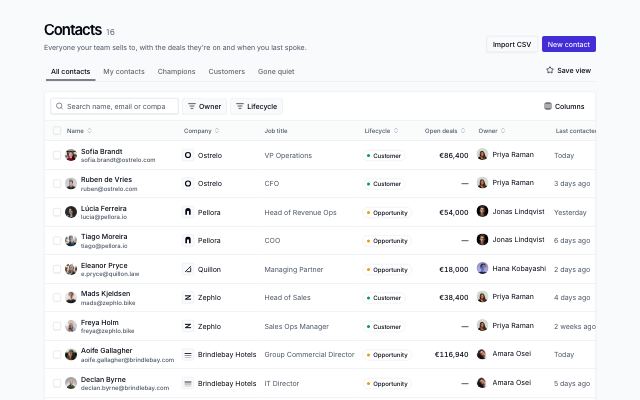
Record table with saved views
productA CRM list page: saved-view tabs, search, column filters with removable chips, a columns menu, sortable headers, row selection with a bulk action bar, row menus and pagination.
In Threadmere
Workflows · 6
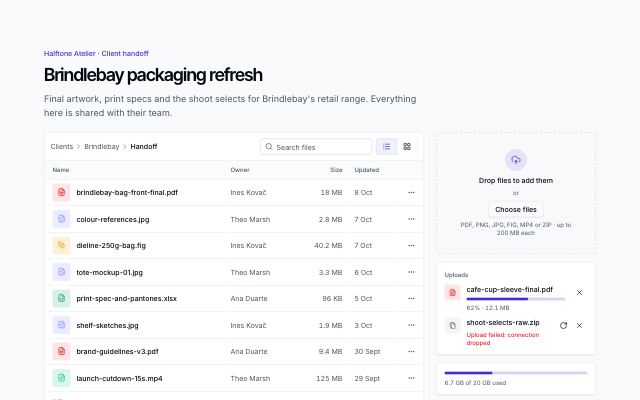
File upload and manager
productA shared project folder: a dropzone and file picker with per-file progress, retry and size limits, files as a list or a grid with search and row menus, an image preview dialog and a storage meter.
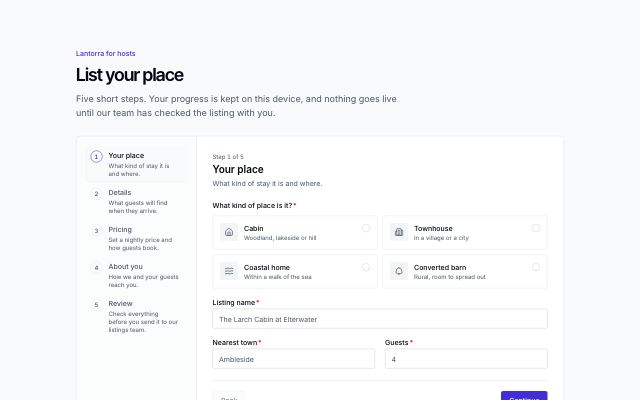
Multistep form wizard
productA long form split into steps: a stepper with complete, current and needs-attention states, choice cards and checkbox groups, per-step validation with an error summary, a review step with edit links, consent and a success state.
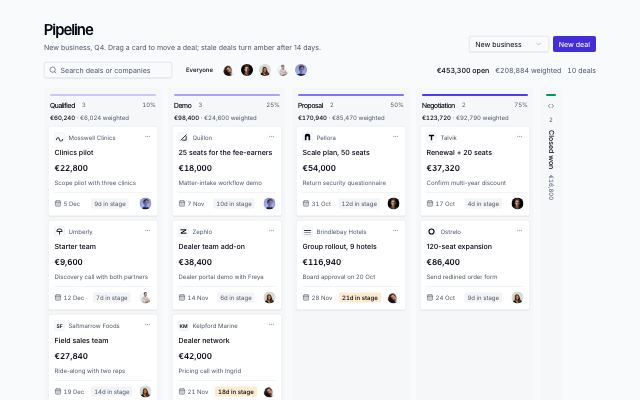
Pipeline board
productA sales pipeline as a kanban board: a column per stage with live count, value and weighted totals; deal cards with company, value, next step, close date, days in stage and owner; drag or menu to move; owner and search filters.
In Threadmere
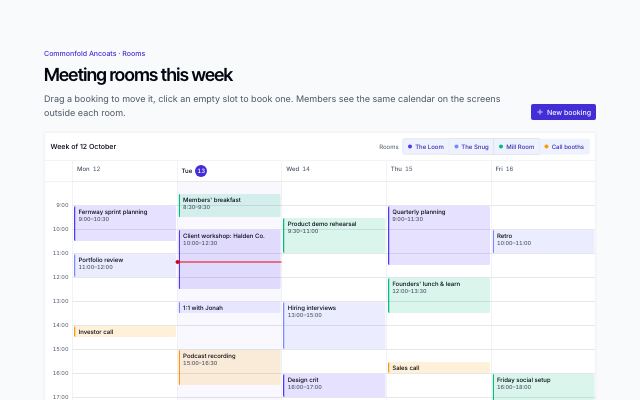
Week scheduler with drag to reschedule
productA week of time slots for a few rooms: bookings laid out side by side when they overlap, drag or arrow keys to reschedule, click an empty slot to book, a room filter, today's now line and a booking dialog.
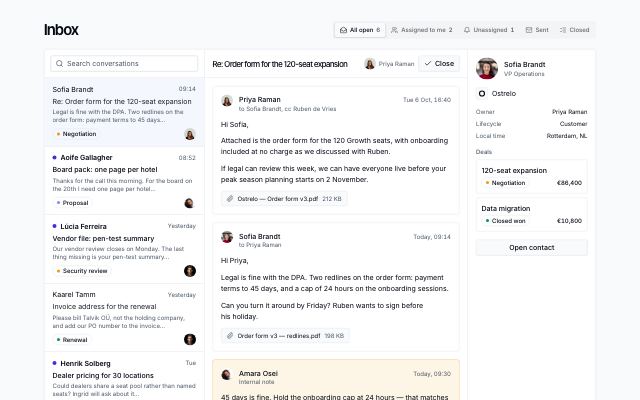
Shared inbox with thread and contact
productA team's shared email inbox: mailbox tabs with counts, a searchable conversation list with unread, tags and assignees, the open thread with attachments and internal notes, a reply or note composer, and the contact with their deals beside it.
In Threadmere
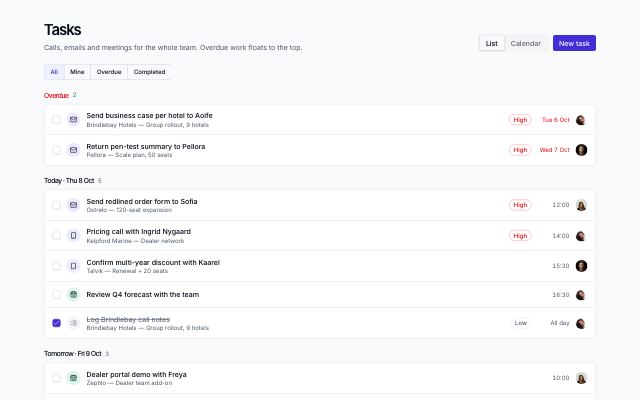
Task planner with agenda and calendar
productA team's tasks as an agenda grouped by due date (overdue first) with quick filters, kinds, priorities and done checkboxes, and a month calendar with event chips and a day panel.
In Threadmere
Settings & billing · 11
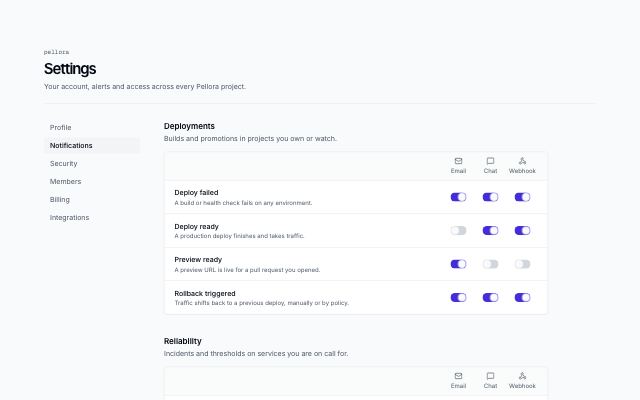
Notification settings matrix
productNotification preferences as a matrix: grouped events down the side, one switch per delivery channel across, plus a digest frequency and quiet hours.
In Rivetlane app
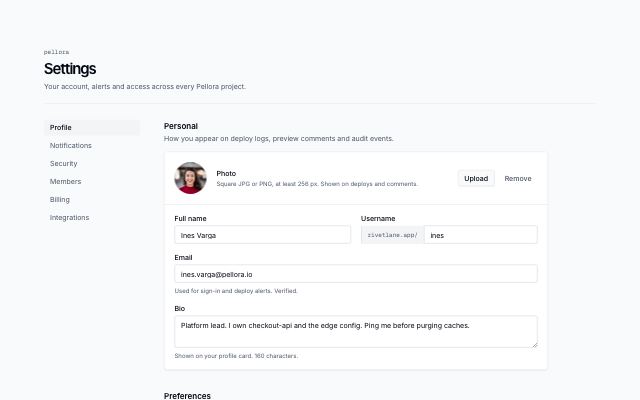
Profile settings
productAccount settings with a section nav: photo with upload and remove, personal fields, preferences with selects, and a save bar.
In Rivetlane app
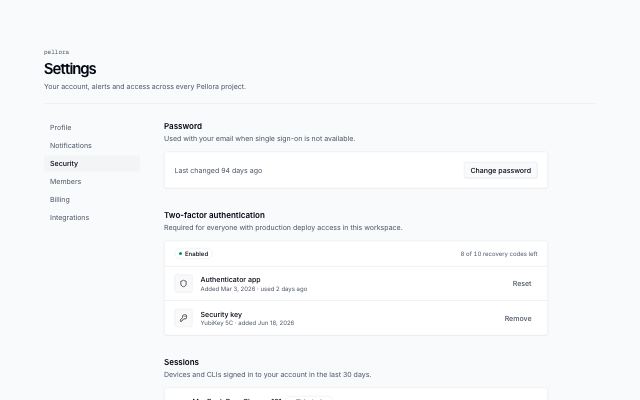
Security settings
productAccount security with a section nav: password, two-factor status and methods, signed-in sessions, masked API tokens in a table, and a danger zone.
In Rivetlane app
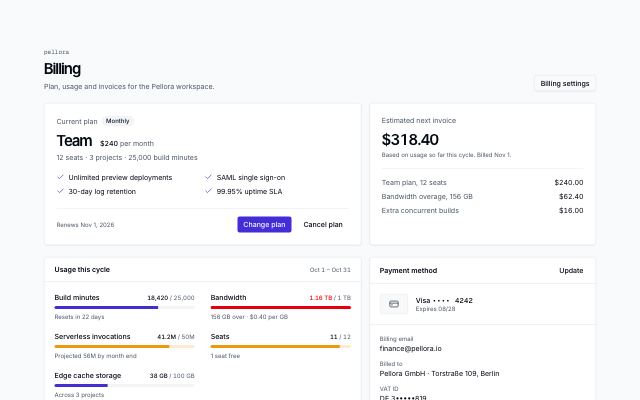
Subscription, usage and invoices
productA billing page: current plan with actions beside the estimated next invoice, usage meters that warn near the limit, the payment method as masked text, and an invoices table.
In Rivetlane app
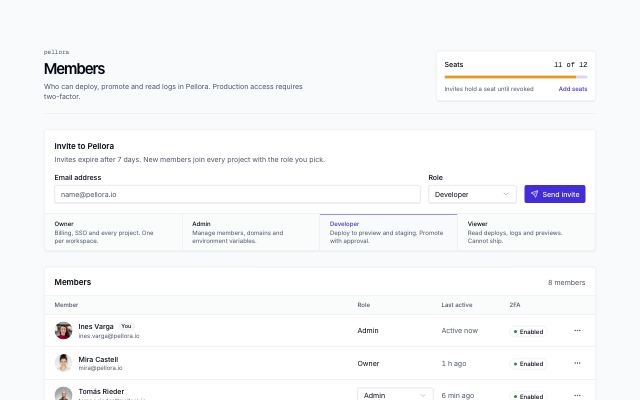
Team members with invites
productWorkspace members page: seat usage meter, invite form with role select and role legend, members list with role, last active and 2FA status, and pending invites with resend and revoke.
In Rivetlane app
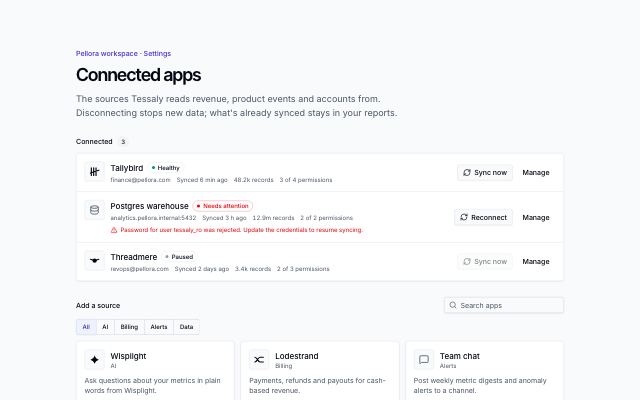
Connected apps management
productIntegrations settings: connected apps with status, account, last sync, records and granted permissions, sync now or reconnect, a manage sheet (permissions, sync frequency, pause, disconnect), and a filterable directory with a permission consent step.
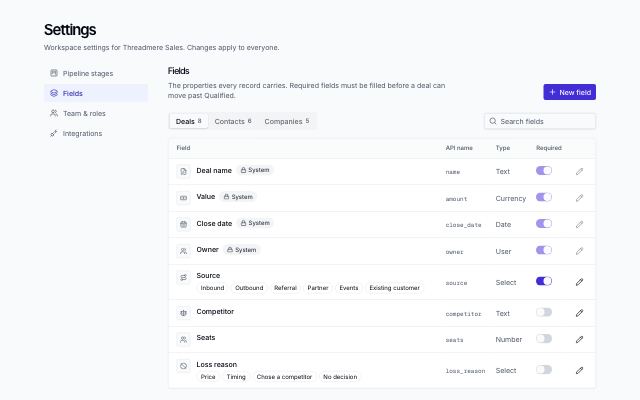
CRM settings: fields
productRecord fields per object (deals, contacts, companies) in tabs: type icon, API name, select options as chips, system-field locks and required switches, with search.
In Threadmere
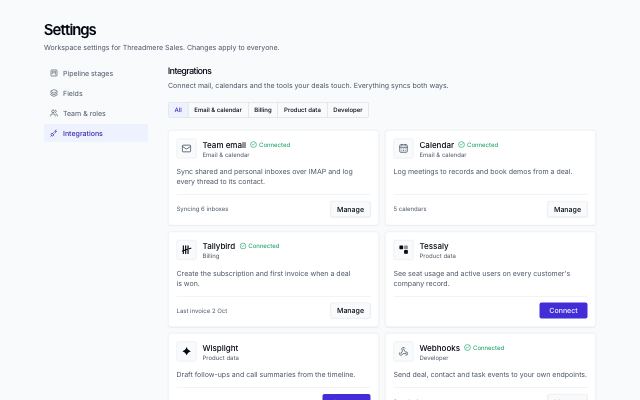
CRM settings: integrations
productIntegration cards filtered by category: mark or icon, description, connected state with a sync detail, connect or manage.
In Threadmere
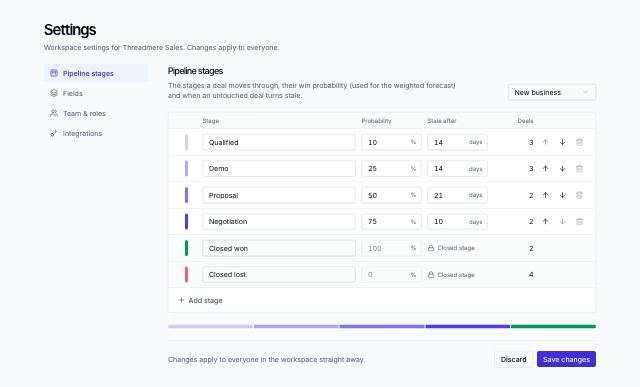
CRM settings: pipeline stages
productSettings for a sales pipeline: stages with editable names, win probability and stale-after days, reorder and remove (blocked while a stage holds deals), add a stage, closed won/lost locked at the end.
In Threadmere
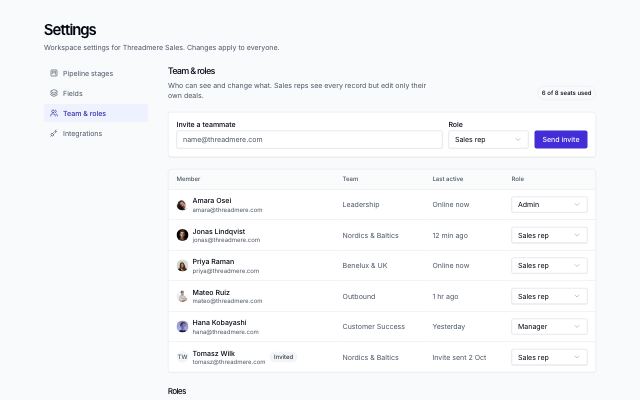
CRM settings: team and roles
productTeam settings: seat count, an invite form with role, the members table with per-member role selects and pending invites, and role cards explaining each permission level.
In Threadmere
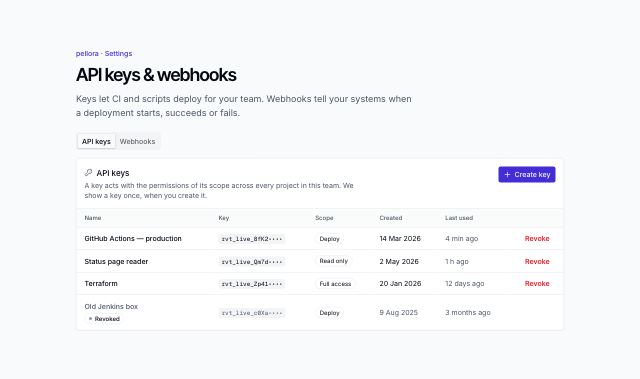
API keys and webhooks settings
productDeveloper settings in two tabs: API keys with scopes, a create dialog with a one-time reveal and copy, and revoke with confirmation; webhook endpoints with event selection and toggles, and recent deliveries with status, payloads and retry.
In Rivetlane app
Engagement · 8
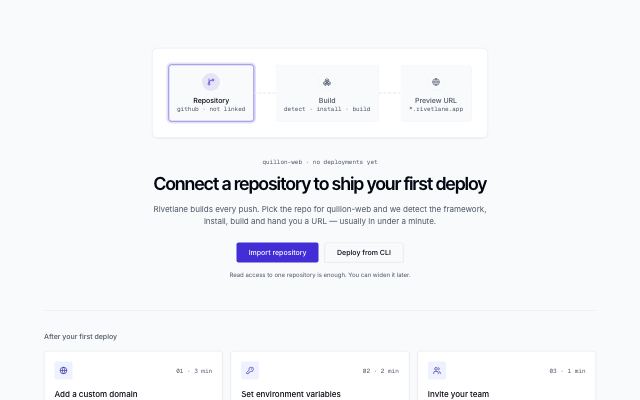
First-run empty state with next steps
productPipeline illustration over a centered title, primary and secondary actions and a note, followed by three numbered next-step cards.
In Rivetlane app
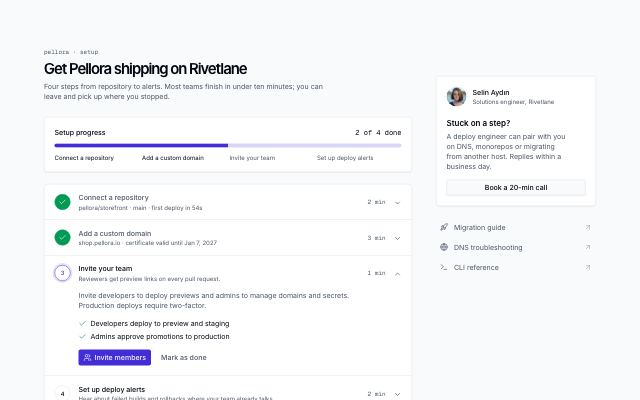
Setup checklist with progress
productFirst-run setup page: progress meter, expandable numbered steps with commands and sub-tasks, mark-as-done that advances to the next step and a completed state, plus a help card with a named engineer and docs links.
In Rivetlane app
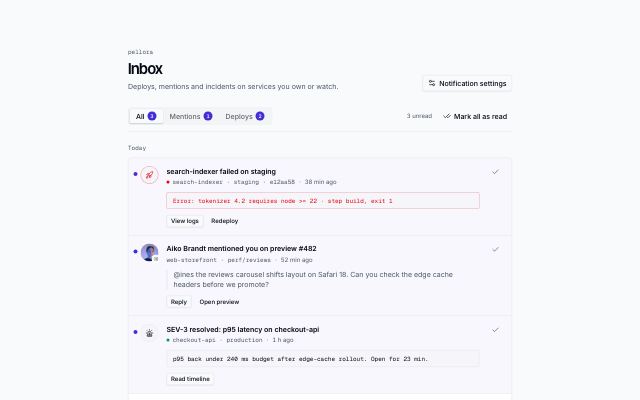
Notifications inbox
productInbox page with All / Mentions / Deploys tabs and unread counts, items grouped by day with unread markers, quoted mentions and log excerpts, inline actions and mark-all-read.
In Rivetlane app
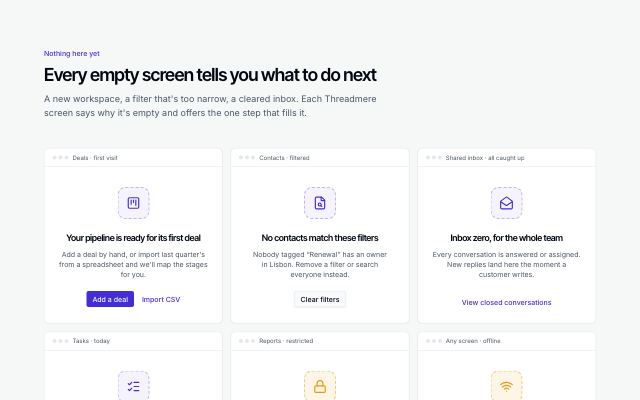
Empty states for an app
productA set of empty states drawn as app panels — first use, no results, inbox zero, no access, offline — each with its icon, a plain explanation and the one action that fixes it.
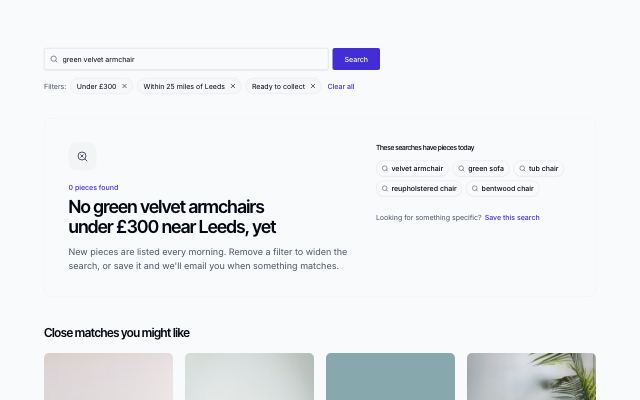
No search results with ways out
productA search that found nothing: the query kept in the box, removable filters and a clear-all link, searches that do have results, and close matches instead of an empty grid.
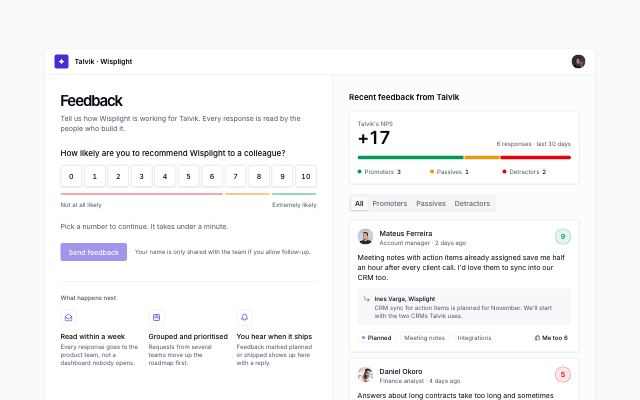
NPS survey with team feedback
productIn-app feedback page: a 0–10 recommendation scale whose follow-up question and reasons change with the score band, optional comment and follow-up consent, a thank-you recap you can edit, and the workspace's recent feedback with a live NPS, band filters, roadmap status, team replies and me-too votes.
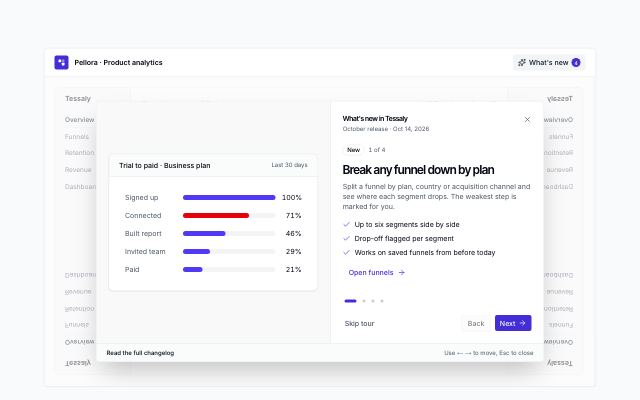
What's new tour over the app
productA release tour that opens over the dimmed product: one step per update with a chart, funnel, cohort or screen visual, progress dots, skip · back · next · done, arrow-key and Esc support, a changelog link, and an up-to-date bar with replay once it closes.
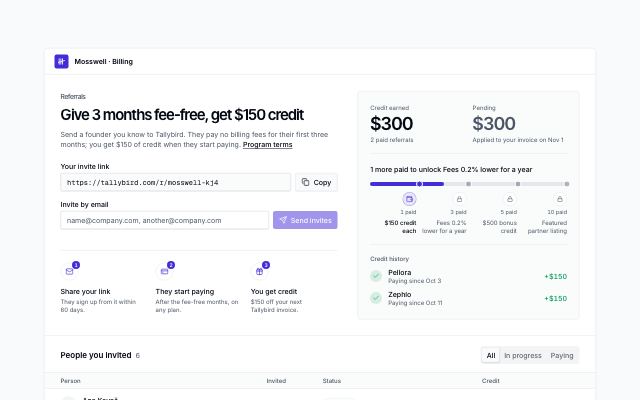
Referral program with rewards
productIn-app referral page: the offer, a personal invite link with copy, email invites that validate and join the list, credit earned and pending, a tier track to the next reward, and the people invited with their status, credit, resend and cancel.
AI · 8
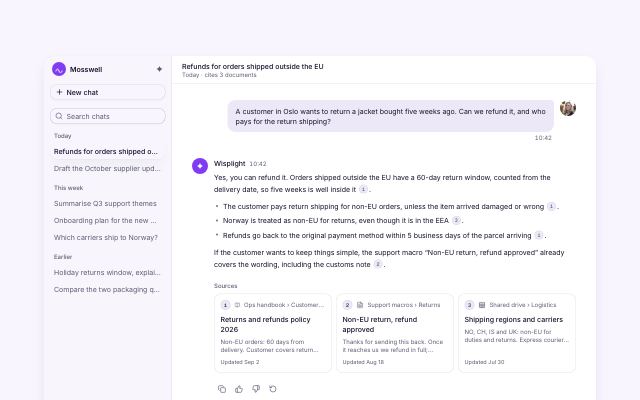
AI chat conversation with citations
productAssistant console: recent threads in a sidebar (a sheet on mobile), a question and a cited answer whose numbered markers link to source cards, feedback actions, follow-up suggestions and a composer with attach and model select.
In Wisplight
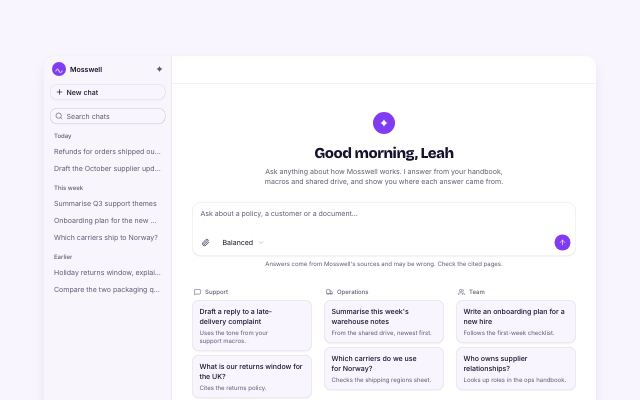
AI chat new-chat prompts
productNew-chat state of the assistant console: greeting, composer with attach and model select, prompt starter cards grouped by use case that fill the composer, and connected sources with sync status.
In Wisplight
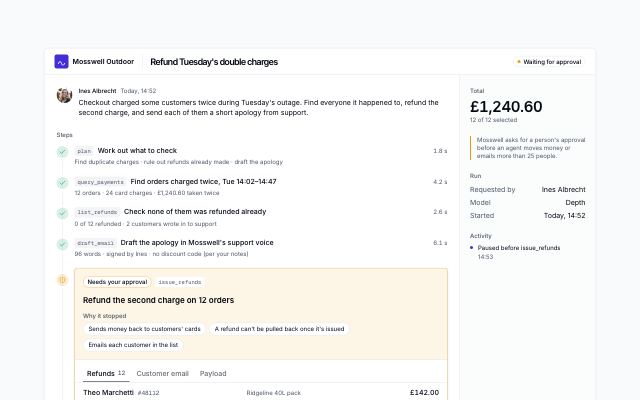
Agent run paused for approval
productAn AI agent run stopped before a risky tool call: the steps so far, the paused call with its line items, the email it would send and the live payload, approve, edit (leave items out, rewrite the message with a diff) or reject with a reason, then the rest of the run plays out with an activity log.
In Wisplight
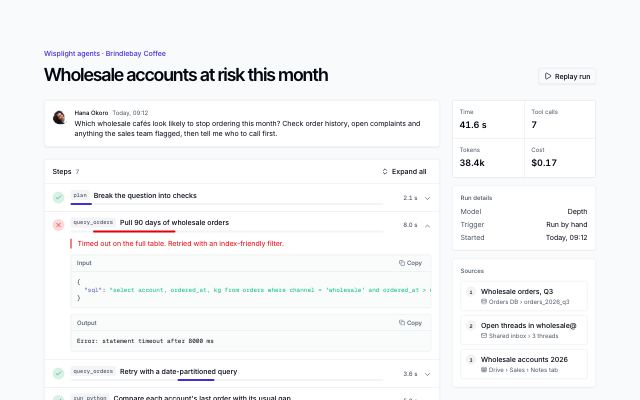
Agent run with tool-call steps
productOne AI agent run laid open: the task, expandable tool-call steps with statuses, timing bars, input and output with copy, a failed call and its retry, a replay, then the cited answer, sources and run totals.
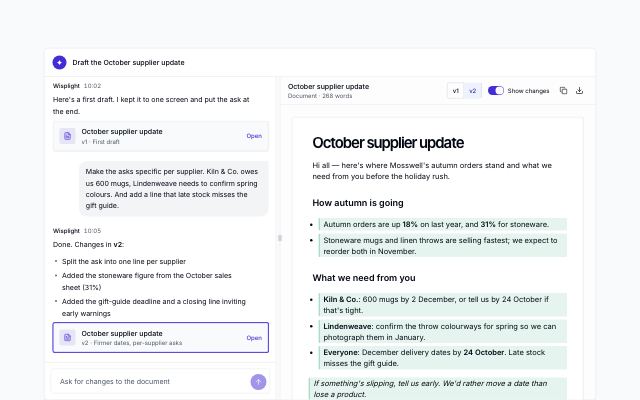
Chat beside a document preview
productA conversation next to the document it is writing: a resizable split (drag or arrow keys) on wide screens and tabs on small ones, version cards in the chat, version switching, highlighted changes, copy and download.
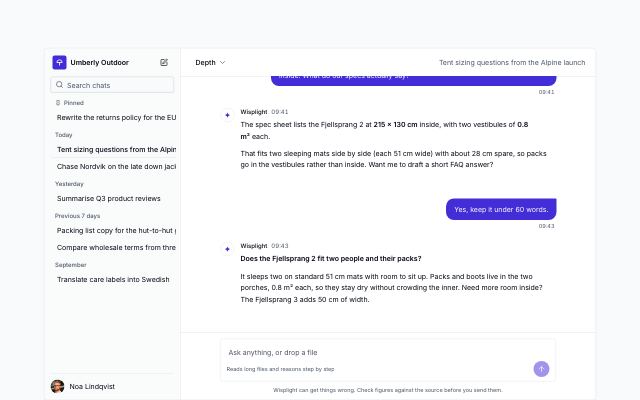
Chat with history sidebar
productAn assistant app with its conversation history: pinned and dated threads with live search, rename, pin and delete, new chat with suggestions, a model picker, multi-turn replies, copy and regenerate.
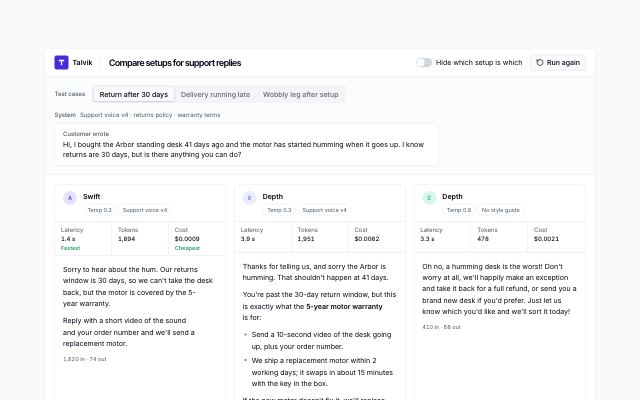
Model setups compared side by side
productThe same test prompts answered by two or three model setups in columns: latency, tokens and cost with the fastest and cheapest flagged, star ratings, a blind mode that hides which setup is which, a timed re-run, a scoreboard across test cases and a winner that becomes the default.
In Wisplight
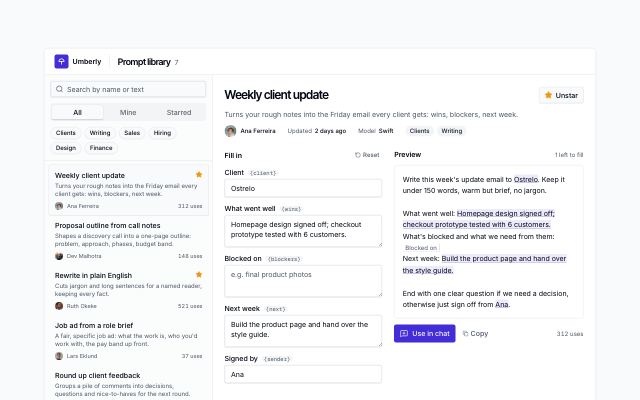
Team prompt library with variables
productA team's saved AI prompts: search, all · mine · starred and tag filters, owners and use counts, then the open prompt with a form for its variables, a live preview that marks filled and missing blanks, copy, use in chat and star.
In Wisplight